Showing posts with label Ethernet Cable. Show all posts

Thursday, September 19, 2019

Network Cable Types and Specifications

Network Cable Types and Specifications

This tutorial explains the types of network cables used in computer networks in detail. Learn the specifications, standards, and features of the coaxial cable, twisted-pair cable, and the fiber-optical cable.

To connect two or more computers or networking devices in a network, network cables are used. There are three types of network cables; coaxial, twisted-pair, and fiber-optic.

Coaxial cable

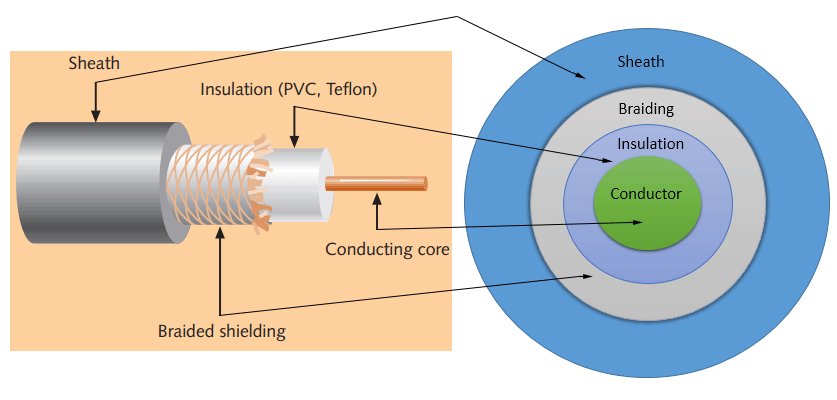
This cable contains a conductor, insulator, braiding, and sheath. The sheath covers the braiding, braiding covers the insulation, and the insulation covers the conductor.

The following image shows these components.
coaxial cable

Sheath

This is the outer layer of the coaxial cable. It protects the cable from physical damage.

Braided shield

This shield protects signals from external interference and noise. This shield is built from the same metal that is used to build the core.

Insulation

Insulation protects the core. It also keeps the core separate from the braided-shield. Since both the core and the braided-shield use the same metal, without this layer, they will touch each other and create a short-circuit in the wire.

Conductor

The conductor carries electromagnetic signals. Based on conductor a coaxial cable can be categorized into two types; single-core coaxial cable and multi-core coaxial cable.

A single-core coaxial cable uses a single central metal (usually copper) conductor, while a multi-core coaxial cable uses multiple thin strands of metal wires. The following image shows both types of cable.

single core and multi-core coaxial cable

Coaxial cables in computer networks

The coaxial cables were not primarily developed for the computer network. These cables were developed for general purposes. They were in use even before computer networks came into existence. They are still used even their use in computer networks has been completely discontinued.

At the beginning of computer networking, when there were no dedicated media cables available for computer networks, network administrators began using coaxial cables to build computer networks.

Because of low-cost and long durability, coaxial cables were used in computer networking for nearly two decades (80s and 90s). Coaxial cables are no longer used to build any type of computer network.

Specifications of coaxial cables

Coaxial cables have been in use for the last four decades. During these years, based on several factors such as the thickness of the sheath, the metal of the conductor, and the material used in insulation, hundreds of specifications have been created to specify the characteristics of coaxial cables.

From these specifications, only a few were used in computer networks. The following table lists them.

TypeOhmsAWGConductorDescription
RG-67518Solid copperUsed in cable network to provide cable Internet service and cable TV over long distances.
RG-85010Solid copperUsed in the earliest computer networks. This cable was used as the backbone-cable in the bus topology. In Ethernet standards, this cable is documented as the 10base5 Thicknet cable.
RG-585024Several thin strands of copperThis cable is thinner, easier to handle and install than the RG-8 cable. This cable was used to connect a system with the backbone-cable. In Ethernet standards, this cable is documented as the 10base2 Thinnet cable.
RG-597520 - 22Solid copperUsed in cable networks to provide short-distance service.
  • Coaxial cable uses RG rating to measure the materials used in shielding and conducting cores.
  • RG stands for the Radio Guide. Coaxial cable mainly uses radio frequencies in transmission.
  • Impedance is the resistance that controls the signals. It is expressed in the ohms.
  • AWG stands for American Wire Gauge. It is used to measure the size of the core. The larger the AWG size, the smaller the diameter of the core wire.

Twisted-pair cables

The twisted-pair cable was primarily developed for computer networks. This cable is also known as Ethernet cable. Almost all modern LAN computer networks use this cable.

This cable consists of color-coded pairs of insulated copper wires. Every two wires are twisted around each other to form pair. Usually, there are four pairs. Each pair has one solid color and one stripped color wire. Solid colors are blue, brown, green and orange. In stripped color, the solid color is mixed with the white color.

Based on how pairs are stripped in the plastic sheath, there are two types of twisted-pair cable; UTP and STP.

In the UTP (Unshielded twisted-pair) cable, all pairs are wrapped in a single plastic sheath.

In the STP (Shielded twisted-pair) cable, each pair is wrapped with an additional metal shield, then all pairs are wrapped in a single outer plastic sheath.

Similarities and differences between STP and UTP cables

  • Both STP and UTP can transmit data at 10Mbps, 100Mbps, 1Gbps, and 10Gbps.
  • Since the STP cable contains more materials, it is more expensive than the UTP cable.
  • Both cables use the same RJ-45 (registered jack) modular connectors.
  • The STP provides more noise and EMI resistant than the UTP cable.
  • The maximum segment length for both cables is 100 meters or 328 feet.
  • Both cables can accommodate a maximum of 1024 nodes in each segment.

The following image shows both types of twisted-pair cable.

STP UTP cable

To learn how twisted-pair cables are used in the LAN network, you can check this tutorial.

Twisted-pair cabling

This tutorial explains how the twisted-pair cable works and how it is used to connect different networking devices in a network.

The TIA/EIA specifies standards for the twisted-pair cable. First standards were released in 1991, known as TIA/EIA 568. Since then, these standards have been continually revised to cover the latest technologies and developments of the transmission media.

The TIA/EIA 568 divides the twisted-pair cable into several categories. The following table lists the most common and popular categories of the twisted-pair cable.

Category / name of the cableMaximum supported speedBandwidth/support signals rateEthernet standardDescription
Cat 11Mbps1MHzNot used for dataThis cable contains only two pairs (4 wires). This cable was used in the telephone network for voice transmission.
Cat 24Mbps10MHzToken RingThis cable and all further cables have a minimum of 8 wires (4 pairs). This cable was used in the token-ring network.
Cat 310Mbps16MHz10BASE-T EthernetThis is the first Ethernet cable that was used in LAN networks.
Cat 420Mbps20MHzToken RingThis cable was used in advanced Token-ring networks.
Cat 5100Mbps100MHz100BASE-T EthernetThis cable was used in advanced (fast) LAN networks.
Cat 5e1000Mbps100MHz1000BASE-T EthernetThis cable/category is the minimum requirement for all modern LAN networks.
Cat 610Gbps250MHz10GBASE-T EthernetThis cable uses a plastic core to prevent cross-talk between twisted-pair. It also uses a fire-resistant plastic sheath.
Cat 6a10Gbps500MHz10GBASE-T EthernetThis cable reduces attenuation and cross-talk. This cable also potentially removes the length limit. This is the recommended cable for all modern Ethernet LAN networks.
Cat 710Gbps600MHzNot drafted yetThis cable sets a base for further development. This cable uses multiple twisted-pairs and shields each pair by its own plastic sheath.
  • Cat 1, 2, 3, 4, 5 are outdated and not used in any modern LAN network.
  • Cat 7 is still a new technology and not commonly used.
  • Cat 5e, 6, 6a are the commonly used twisted-pair cables.

Fiber optic cable

This cable consists of core, cladding, buffer, and jacket. The core is made from the thin strands of glass or plastic that can carry data over the long distance. The core is wrapped in the cladding; the cladding is wrapped in the buffer, and the buffer is wrapped in the jacket.

  • Core carries the data signals in the form of the light.
  • Cladding reflects light back to the core.
  • Buffer protects the light from leaking.
  • The jacket protects the cable from physical damage.

Fiber optic cable is completely immune to EMI and RFI. This cable can transmit data over a long distance at the highest speed. It can transmit data up to 40 kilometers at the speed of 100Gbps.

Fiber optic uses light to send data. It reflects light from one endpoint to another. Based on how many beams of light are transmitted at a given time, there are two types of fiber optical cable; SMF and MMF.

SMF MMF Fiber optical cable

SMF (Single-mode fiber) optical cable

This cable carries only a single beam of light. This is more reliable and supports much higher bandwidth and longer distances than the MMF cable. This cable uses a laser as the light source and transmits 1300 or 1550 nano-meter wavelengths of light.

MMF (multi-mode fiber) optical cable

This cable carries multiple beams of light. Because of multiple beams, this cable carries much more data than the SMF cable. This cable is used in shorter distances. This cable uses an LED as the light source and transmits 850 or 1300 nano-meter wavelengths of light.

That’s all for this tutorial. In the next part of this article, we will understand the types of connectors that are used to connect cables with networking devices. If you like this tutorial, please don’t forget to share it with friends through your favorite social channel.

Ethernet Cable: Types, Performance & Pinout - Cat 5, 5e, 6, 6a, 7, 8

There are many Ethernet cables that can be bought. Often these cables are supplied free with equipment that uses Ethernet connectivity in some way or another.

There are several different varieties of Ethernet cable that can be obtained: speed variations, crossover cables, Cat 5, Cat 5e, Cat6, Cat 6a, Cat 7etc..

Normally Ethernet cables will be bought and there is no major need to understand what is inside or on the connectors, although it can be both interesting and helpful on some occasions. Even so, an understanding of the different types of Ethernet cable and the maximum lengths that should be used is helpful.

The commonly used network cables: Cat 5, Cat 5e, Cat 6, Cat 6a, Cat7 all have different levels of performance, and therefore to is necessary to buy or select the right cable for the right application.

These network cables are used for connecting a variety of network elements from Ethernet switches and Ethernet routers to computers, servers and other network items - if there is an Ethernet interface, they can be connected using Ethernet cables.

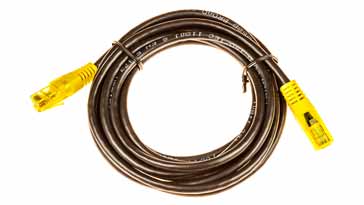
Typical Ethernet cable supplied with many computers, Ethernet routers, etc
Typical Ethernet cable supplied with many computers, routers, etc

Ethernet cable basics

The Ethernet cables for connectivity in most office and home environments rely on twisted wire pairs within an overall cable - Cat 5, Cat 6 and Cat 7 all used this format. Twisting the wires together enables the currents to balance, i.e in one wire the current is moving in one direction, and int he other wire of the pair the current is going in the other, enabling the overall fields around the twisted pair to cancel.

In this way, data can be transmitted over considerable lengths without the need for undue precautions.

As several twisted pairs are contained within a particular network cable, the number of twisted per unit length is arranged to be different for each pair - the rate being based on prime numbers so that no two twists ever align. This reduces crosstalk within the cable.

The Ethernet cables are available in a variety of lengths as patch cables, or the cable itself is available for incorporating into systems, buildings, etc. The terminations can then be made to the required connector using a crimp tool. These network cables are available in a variety of lengths - long Ethernet cables are available, some of the longest being up to 75 metres.

Earlier network cables were unshielded, but later ones were shielded to improve the performance. For example an unshielded twisted pair (UTP) cable may be satisfactory for a short run between a computer and router, but a foil shielded cable, FTP, is best longer runs or where the cable passes through areas of high electrical noise.

Ethernet cable and connector used for connecting items including Ethernet switches, Ethernet routers, computers, network servers, etc.
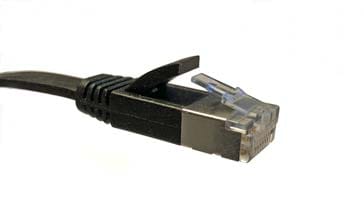
Flat Ethernet cable and connector

There are different methods that can be used for shielding Ethernet cables. The most common is to place a shield around each twisted pair. This not only provides shielding for the cable externally, but also reduces crosstalk between the internal twisted pairs as well. Manufacturers can further enhance the performance by placing shielding around all the wires in the cable just under the cable sheath. There are different codes used to indicate the differs types of shielding:

  • U/UTP - Unshielded cable, unshielded twisted pairs
  • F/UTP - Foil shielded cable, unshielded twisted pairs
  • U/FTP - Unshielded cable, foil shielded twisted pairs
  • S/FTP - braided shielded cable, foil shielded twisted pairs

Where: TP = twisted pair, U = unshielded, F = foil shielded, S = braided shielding.

A further difference within the Ethernet cables whether Cat 5, Cat 5e, Cat 6, Cat 6e, or Cat 7 can be whether solid or stranded wires are used within the cable. As the description implies, a solid cable uses a single piece of copper for the electrical conductor within each wire of the cable whilst stranded wire uses a series of copper strands twisted together. Although when buying a patch cable, it may not be necessary to know this, when installing a long cable run it may be important as each type is slightly more suitable for different applications.

  • Stranded cable:   This type of wire is more flexible and it is more applicable for Ethernet cables where the cable may be moved - often it is idea for patch leads at desks or general connections to PCs, etc where some movement may be needed and expected.
  • Solid cable:   Solid cable is not as flexible as the stranded type, but it is also more durable. This makes it best for use in permanent installations like cable installations under floors, embedded in walls and the like.

Categories for Ethernet cables

A variety of different cables are available for Ethernet and other telecommunications and networking applications. These network cables that are described by their different categories, e.g. Cat 5 cables, Cat-6 cables, etc, which are often recognised by the TIA (telecommunications Industries Association) and they are summarised below:

  • Cat-1:     This is not recognised by the TIA/EIA. It is the form of wiring that is used for standard telephone (POTS) wiring, or for ISDN.
  • Cat-2:     This is not recognised by theTIA/EIA. It was the form of wiring that was used for 4Mbit/s token ring networks.
  • Cat-3:     This cable is defined in TIA/EIA-568-B. It is used for data networks employing frequencies up to 16 MHz. It was popular for use with 10 Mbps Ethernet networks (100Base-T), but has now been superseded by Cat-5 cable.
  • Cat-4:     This cable is not recognised by the TIA/EIA. However it can be used for networks carrying frequencies up to 20 MHz. It was often used on 16Mbps token ring networks.
  • Cat-5:     This is not recognised by the TIA/EIA. This is the network cable that is widely used for 100Base-T and 1000Base-T networks as it provides performance to allow data at 100 Mbps and slightly more (125 MHz for 1000Base-T) Ethernet. The Cat 5 cable superseded the Cat 3 version and for a number of years it became the standard for Ethernet cabling. Cat 5 cable is now obsolete and therefore it is not recommended for new installations.

    Cat 5 cable uses twisted pairs to prevent internal crosstalk, XT and also crosstalk to external wires, AXT.

    Although not standardised, the Cat 5 cable normally uses 1.5 - 2 twists per centimetre.
  • Cat-5e:     This form of cable is recognised by the TIA/EIA and is defined in TIA/EIA-568, being last revised in 2001. It has a slightly higher frequency specification that Cat-5 cable as the performance extends up to 125 Mbps.

    Cat-5e can be used for 100Base-T and 1000Base-t (Gigabit Ethernet). Cat 5e standard for Cat 5 enhanced and it is a form of Cat 5 cable manufactured to higher specifications although physically the same as Cat 5. It is tested to a higher specification to ensure it can perform at the higher data speeds. The twisted pairs within the network cables tend to have the same level of twisting as the Cat 5 cables.
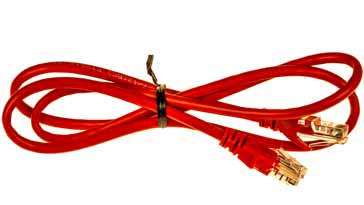
  • Red Ethernet cable
  • Cat-6:     This cable is defined in TIA/EIA-568-B provides a significant improvement in performance over Cat5 and Cat 5e. During manufacture Cat 6 cables are more tightly wound than either Cat 5 or Cat 5e and they often have an outer foil or braided shielding. The shielding protects the twisted pairs of wires inside the Ethernet cable, helping to prevent crosstalk and noise interference. Cat-6 cables can technically support speeds up to 10 Gbps, but can only do so for up to 55 metres - even so this makes them relatively long Ethernet cables.

    The Cat 6 Ethernet cables generally have 2+ twists per cm and some may include a nylon spline to reduce crosstalk, although this is not actually required by the standard.
  • Cat-6a:     The “a” in Cat 6a stands for “Augmented” and the standard was revised in 2008. The Cat 6a cables are able to support twice the maximum bandwidth, and are capable of maintaining higher transmission speeds over longer network cable lengths. Cat 6a cables utilise shielded which is sufficient to all but eliminate crosstalk. However this makes them less flexible than Cat 6 cable.
  • Cat-7:     This is an informal number for ISO/IEC 11801 Class F cabling. It comprises four individually shielded pairs inside an overall shield. It is aimed at applications where transmission of frequencies up to 600 Mbps is required.
  • Cat-8:     These cables are still in development, but will be released in the foreseeable future to provide further improvements in speed and general performance.

Further descriptions of Cat-5 and Cat-5e cables are given below as these are widely used for Ethernet networking applications today.

ETHERNET CABLE PERFORMANCE SUMMARY
 
CATEGORYSHIELDINGMAX TRANSMISSION SPEED (AT 100 METERS)MAX BANDWIDTH
Cat 3Unshielded10 Mbps16 MHz
Cat 5Unshielded10/100 Mbps100 MHz
Cat 5eUnshielded1000 Mbps / 1 Gbps100 MHz
Cat 6Shielded or Unshielded1000 Mbps / 1 Gbps>250 MHz
Cat 6aShielded10000 Mbps / 10 Gbps500 MHz
Cat 7Shielded10000 Mbps / 10 Gbps600 MHz
Cat 8Details to be released later
Ethernet cable connectors


The RJ45, Registered Jack 45 connector is used almost universally as the physical connector used on Ethernet cables, and with networking cables in general. From Ethernet Category 3 right through to Cat 6, the RJ45 is the format that is used. Cat 7 Ethernet cables can be terminated with RJ45 connectors but specialised versions called GigaGate45 (GG45) are often used. Fortunately these are backwards compatible with the RJ45 so there is no need to have a completely new installation when migrating to Cat 7.

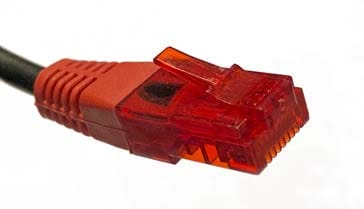
Ethernet RJ45 connector on an Ethernet cable

The RJ45 connector used on the ends of Ethernet cables are small plastic plugs with a retaining catch that can be released when the cable needs to be removed. The term plug refers to the male end of the connection on the network cable, and the jack refers to the port or female and normally located on the equipment.

The RJ45 connector has eight pins that are spaced around 1 mm apart, and the wires are inserted and crimped to provide a reliable connection. The actual connector type is known as an 8P8C - eight position - eight contact.

Strictly speaking the actual connector type should be reared to as an 8P8C, and the wiring pattern is RJ45, but in reality the term RJ45 for Ethernet cables is used almost universally.

Ethernet cable pinout

Although the wiring and the cable manufacture details may vary between the different cable categories, the basic connectivity remains the same. In this way Ethernet cables can be used reliably to make connections between items of equipment, etc.

A summary of the signals carried and the relevant wires and connections is given in the table below:


RJ-45 / CAT 5 / CAT 5E PINOUT & WIRING
PIN
NO
TELEPHONE10BASE-T100BASE-T1000BASE-TPOE
MODE A
POE
MODE B
1 +TX+TD+BI_DA48 V out 
2 -TX-TX-BI_DA48 V out 
3 +RX+RX+BI_DB48 V return 
4Ring  +BI_DC 48 V out
5Tip  -BI_DC 48 V out
6 -RX-RX-BI_DB48 V return 
7   +BI_DD 48 V return
8   -BI_DD 48 V return

In the table, TX is transmitted data, and RX is received data. BI_Dn is bi-directional data, A, B, C, and D.

There are two standard RJ45 pinouts for the individual arrangement of the wire connections to the RJ45 connectors within an Ethernet cable: the T568A and T568B standards.

One or other of the conventions should be followed, as this will ensure the required connectivity, although as it is just a colour convention and the same wires and pairs are connected to the same pins, it does not matter which one is followed. In practice T568B is the more commonly used, and therefore it is probably best to use this one. The standard used may also be indicated on the sheath of ready made Ethernet cables.


RJ-45 PINOUT & WIRING
PINT568AT568B
1White with green stripeWhite with orange stripe
2GreenOrange
3White with orange stripeWhite with green stripe
4BlueBlue
5White with blue stripeWhite with blue stripe
6OrangeGreen
7White with brown stripeWhite with brown stripe
8BrownBrown
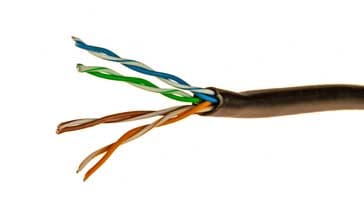
Ethernet cable (Cat 5e) showing the internal twisted pair wires
Ethernet cable with outer sheath stripped back to show the internal twisted pair wires

Ethernet Cat 5 crossover cables

There are a number of different configurations of cable that may be employed according to the equipment and the requirement. The most common type are the straight through cables which are wired in a 1 to 1 configuration. However Cat-5 crossover cables are also required on occasions.

Typically a Cat-5 cable used to connect a computer (PC) to a switch will be a straight through cable. However if two computers or two switches are connected together then a Cat5 crossover cable is used.

Many Ethernet interfaces in use today are able to detect the type of cable, whether it is a straight through or crossover cable, and they are able to adapt to the required format. This means that the requirement for Cat-5 crossover cables is less than it might otherwise be.

When using Cat-5 Ethernet crossover cables, they are not marked with the fact that they are crossover cables. Accordingly it is often wise to mark them to avoid confusion later.

Ethernet cable maximum lengths

Often it is necessary to use long Ethernet cables, however there are limits to the distance over which the data can be reliably carried. When long Ethernet cables are used, additional noise is picked up, and the data eventually becomes distorted by the cable.

A summary of Ethernet cables and their maximum operating lengths is given below:

MAXIMUM LENGTHS FOR LONG ETHERNET CABLES
SPECIFICATIONCABLE TYPEMAXIMUM LENGTH
10BaseTUnshielded Twisted Pair100 metres
10Base2Thin coaxial cable180 metres
10Base5Thick coaxial cable500 metres
10BaseFFibre optic cable2000 metres
100BaseTUnshielded twisted pair100 metres
100BaseTXUnshielded twisted pair220 metres

Lengths provided are those generally accepted as the maximum, but are not included in the IEEE standard.


A variety of different cables are seen connecting different Ethernet elements together - Ethernet routers, Ethernet switches, computers, network severs, etc. Cat5, Cat5e and Cat6 are all seen. The cables use the cost efficient but effective RJ45 patch connector and using this, these Ethernet cables are able to link or patch multiple items of Ethernet based equipment together. On some occasions where specialised connectivity is needed crossover cables may be required - these sold be clearly marked as such as they may get used elsewhere unknowingly and cause the connection not to work. Apart from this using Cat 5, Cat5e and Cat 6 Ethernet cables is very easy and there are normally very few issues.