Showing posts with label unit-6. Show all posts

Thursday, April 16, 2020

application layer protocol ( dns smtp pop ftp http)

https://gradeup.co/application-layer-protocols-dns-smtp-pop-ftp-http-i-ba1194bd-c5ab-11e5-9dcb-5849de73f8e1

An application layer protocol defines how application processes (clients and servers), running on different end systems, pass messages to each other. In particular, an application layer protocol defines:
  • The types of messages, e.g., request messages and response messages.
  • The syntax of the various message types, i.e., the fields in the message and how the fields are delineated.
  • The semantics of the fields, i.e., the meaning of the information that the field is supposed to contain;
  • Rules for determining when and how a process sends messages and responds to messages.
1 SMTP (Simple Mail Transfer Protocol):
  • One of the most popular network service is electronic mail (e-mail).
  • The TCP/IP protocol that supports electronic mail on the Internet is called Simple Mail Transfer Protocol (SMTP).
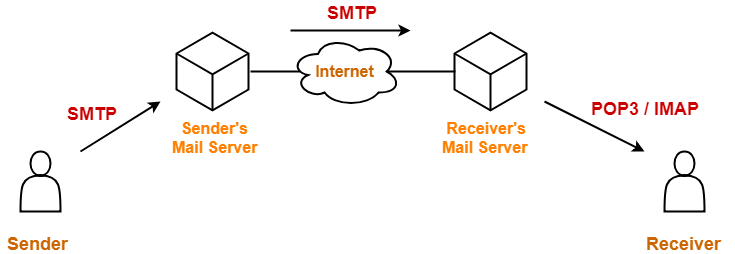
  • SMTP transfers messages from senders' mail servers to the recipients' mail servers using TCP connections.
  • Users based on e-mail addresses.
  • SMTP provides services for mail exchange between users on the same or different computers.
  • Following the client/server model:
    • SMTP has two sides: a client side which executes on a sender's mail server, and server side which executes on recipient's mail server.
    • Both the client and server sides of SMTP run on every mail server.
    • When a mail server sends mail (to other mail servers), it acts as an SMTP client.
    • When a mail server receives mail (from other mail servers) it acts as an SMTP server.
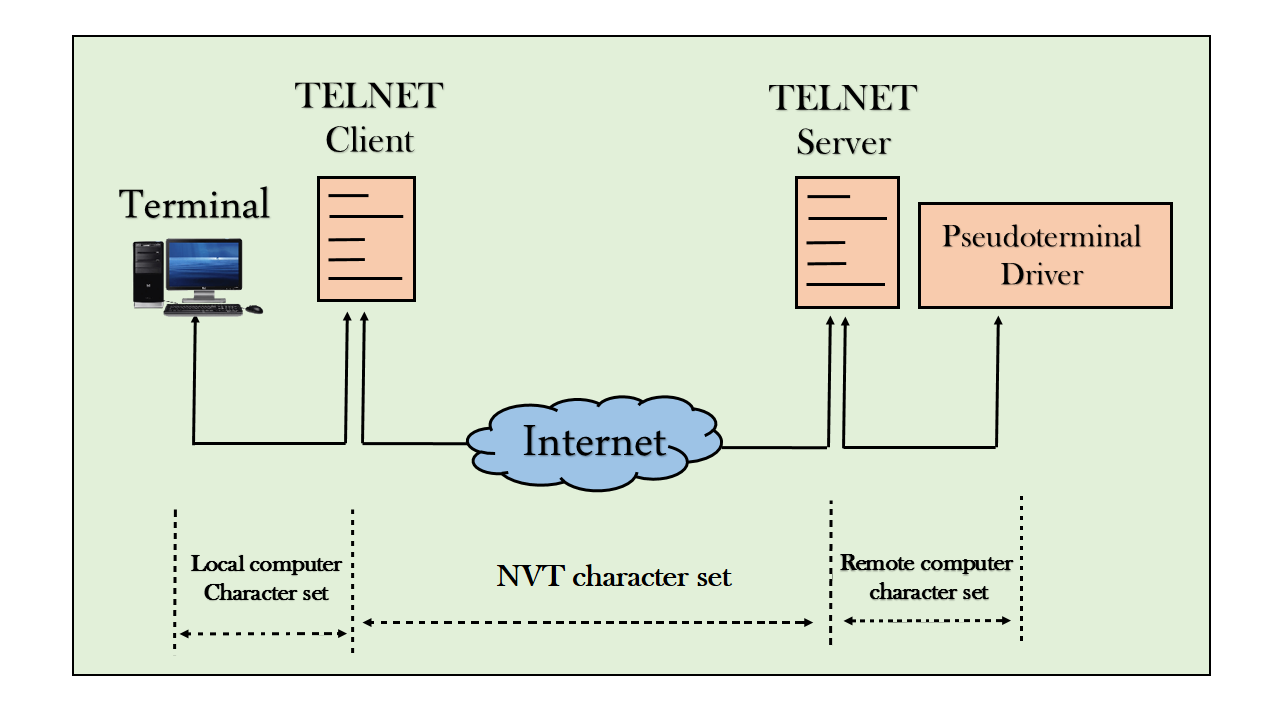
TELNET (Terminal Network):
  • TELNET is client-server application that allows a user to log onto remote machine and lets the user to access any application program on a remote computer.
  • TELNET uses the NVT (Network Virtual Terminal) system to encode characters on the local system.
  • On the server (remote) machine, NVT decodes the characters to a form acceptable to the remote machine.
  • TELNET is a protocol that provides a general, bi-directional, eight-bit byte oriented communications facility.
  • Many application protocols are built upon the TELNET protocol
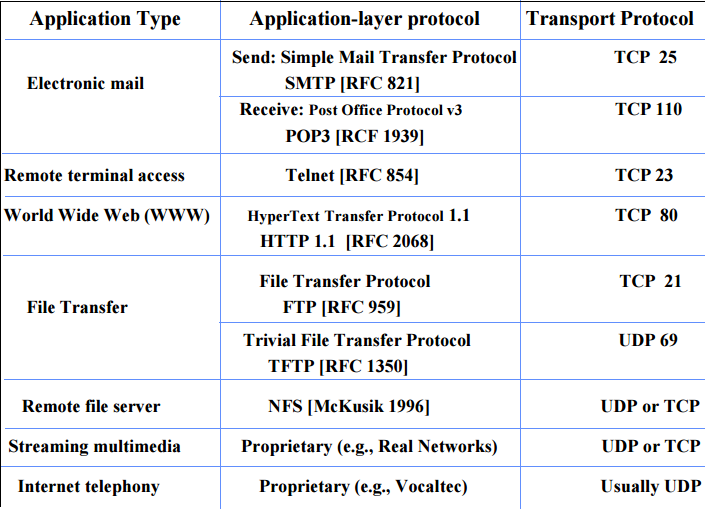
  • Telnet services are used on PORT 23.
FTP (File Transfer Protocol):
  • FTP is the standard mechanism provided by TCP/IP for copying a file from one host to another.
  • FTP differs form other client-server applications because it establishes 2 connections between hosts.
  • Two connections are: Data Connection and Control Connection.
  • Data Connection uses PORT 20 for the purpose and control connection uses PORT 21 for the purpose.
  • FTP is built on a client-server architecture and uses separate control and data connections between the client and the server.
  • One connection is used for data transfer, the other for control information (commands and responses).
  • It transfer data reliably and efficiently.
Multipurpose Internet Mail Extensions (MIME):
  • It is an extension of SMTP that allows the transfer of multimedia messages.
  • If binary data is included in a message MIME headers are used to inform the receiving mail agent:
    •  Content-Transfer-Encoding: Header alerts the receiving user agent that the message body has been ASCII encoded and the type of encoding used.
    • Content-Type: Header informs the receiving mail agent about the type of data included in the message.
POP (Post Office Protocol):
  • POP is also called as POP3 protocol.
  • This is a protocol used by a mail server in conjunction with SMTP to receive and holds mail for hosts.
  • POP3 mail server receives e-mails and filters them into the appropriate user folders. When a user connects to the mail server to retrieve his mail, the messages are downloaded from mail server to the user's hard disk.
HTTP (Hypertext Transfer Protocol):
  • This is a protocol used mainly to access data on the World Wide Web (www).
  • The Hypertext Transfer Protocol (HTTP) the Web's main application-layer protocol although current browsers can access other types of servers
  • A respository of information spread all over the world and linked together.
  • The HTIP protocol transfer data in the form of plain text, hyper text, audio, video and so on.
  • HTTP utilizes TCP connections to send client requests and server replies.
  •  it is a synchronous protocol which works by making both persistent and non persistent connections.
Domain Name System (DNS):
  • To identify an entity, TCP/IP protocol uses the IP address which uniquely identifies the connection of a host to the Internet.
  • DNS is a hierarchical system, based on a distributed database, that uses a hierarchy of Name Servers to resolve Internet host names into the corresponding IP addresses required for packet routing by issuing a DNS query to a name server.
  • However, people refer to use names instead of address. Therefore, we need a system that can map a name to an address and conversely an address to name.
  • In TCP/IP, this is the domain name system.
  • DNS in the Internet: DNS is protocol that can be used in different platforms.
  • Domain name space is divided into three categories.
  • Generic Domain: The generic domain defines registered hosts according, to their generic behaviour. Each node in the tree defines a domain which is an index to the domain name space database.
image002
  • Country Domain: The country domain section follows the same format as the generic domain but uses 2 characters country abbreviations (e.g., US for United States) in place of 3 characters.
  • Inverse Domain: The inverse domain is used to map an address to a name.
Overview of Services
image001


Thursday, February 6, 2020

Functions of Application Layer

Reference:

https://www.includehelp.com/computer-networks/functions-of-application-layer-in-the-osi-model.aspx

https://www.studytonight.com/computer-networks/osi-model-application-layer

What is Application Layer?

The Application Layer is at the top level of the OSI model. It is permissible by this layer to the software or user to get access to the network.
  • It provides interfaces and support for services such as electronic mail, remote file access, and transfer, shared database management, directory services, network resources, etc. and other types of distributed information services also.
  • In numerous ways manipulation of data (information) is done in this layer.
  • The Application Layer contains a variety of protocols that are commonly required by users. A widely-used application protocol is HTTP (HyperText Transfer Protocol), which is the basis for the World Wide Web(WWW).
  • When a browser requests a web page, it sends the name of the page it wants to the server using HTTP. The server then fulfills the request by sending the page back.
  • The application layer uses More than 15 protocols, including File Transfer Protocol, Telnet, Trivial File Transfer Protocol, and Simple Network Management Protocol, etc.
Example:
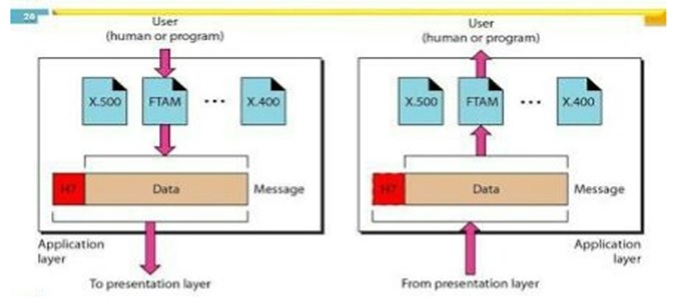
Out of many available application services, the figure shows three services: X.400 (message-handling services);
  • File transfer, access, and management (FTAM).
  • The user in this example uses X.400 to send an e-mail message.
  • There is no headers or trailers are added in this layer.
This figure shows the relationship of the Application layer to the user and the presentation layer.
the application layer

Design Issues with Application Layer

In the design and implementation of Application Layer protocols occurring problems and these problems can be addressed by patterns from several different pattern languages:
  • Design (pattern) Language for Application-level Communication Protocols
  • Service Design Patterns
  • Enterprise Application Architecture's Patterns
  • Pattern-Oriented Software Architecture

Functionalities of the Application layer

Specific functionalities of the Application layer are as follows:
1) Network Virtual terminal
  • The application layer is the software version of a physical terminal and this layer permitted to a user to log on to a remote host.
  • For this, an application creates a software emulation of a terminal at the remote host. By this user's computer can communicate with the software terminal, which in turn, communicates with the host.
  • It is shown that the remote host is communicating with one of its terminals, so it allows the user to log on.
2) File Transfer, Access, and Management (FTAM)
  • An application permits a user to access files in a remote computer, to retrieve files from a computer and to manage files on a remote computer.
  • FTAM is concerned with a hierarchical virtual file in terms of file attributes, file structure and the types of operations performed on the files and their attributes.
3) Addressing
  • To achieve communication between client and server system, there is a need for addressing.
  • When a request is sent from the client side to the server side, this request contains the server address and its own address.
  • The server answered to the client request, this request contains the destination address, i.e., client address. DNS is used to achieve this type of addressing.
4) Mail Services
Email forwarding and storage of e-mails provided by an application layer.
5) Directory Services
A distributed database is contained by an application that provides access for global information about various objects and services.
6) Authentication
It provides authentication to occur between devices for an extra layer of security and it authenticates the sender or receiver's message or both.

POP Protocol | IMAP Protocol | POP Vs IMAP

Reference: https://www.gatevidyalay.com/post-office-protocol-pop3-imap-vs-pop3/

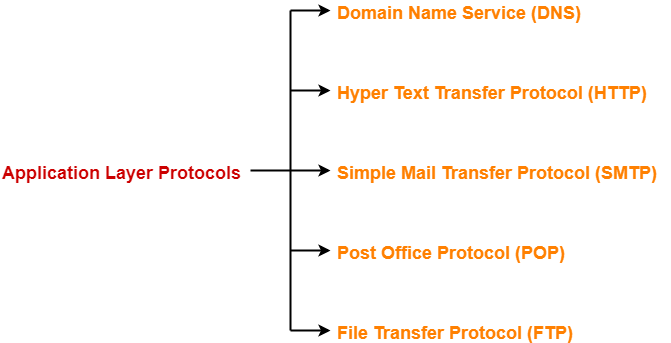
Important application layer protocols are-
 

  1. Domain Name Service (DNS)
  2. Hyper Text Transfer Protocol (HTTP)
  3. Simple Mail Transfer Protocol (SMTP)
  4. Post Office Protocol (POP)
  5. File Transfer Protocol (FTP)

In this article, we will discuss about Post Office Protocol (POP).

Post Office Protocol-


  • POP is short for Post Office Protocol.
  • It is an application layer protocol.
Post Office Protocol (POP) enables a workstation to retrieve mail from a mail server. With POP, mail is downloaded from the server to the client and then deleted on the server.

The server starts the POP service by passively listening on TCP port 110 for client connection requests. When a client wants to make use of the service, it sends a request to establish a TCP connection with the server. When the connection is established, the POP server sends a greeting. The client and POP server then exchange commands and responses until the connection is closed or aborted.

Because email messages are downloaded to the client and removed from the server, there is not a centralized location where email messages are kept. Because POP does not store messages, it is undesirable for a small business that needs a centralized backup solution.
POP3 is desirable for an ISP, because it alleviates their responsibility for managing large amounts of storage for their email servers.

Purpose-


  • It is a message access protocol.
  • It enables the clients to receive or download the emails from their remote mail server.
  • POP version 3 (POP3) is the most popularly used version.

Working-


To retrieve a message from the mail server-
  • Client establishes a TCP connection using port 110.
  • Client identifies itself to the server.
  • Client issues a series of POP3 commands.


Characteristics of POP-


  • POP is a pull protocol.
  • POP uses TCP at the transport layer.
  • POP uses port number 110.
  • POP uses persistent TCP connections.
  • POP is a connection oriented protocol.
  • POP is an in-band protocol.
  • POP is a stateful protocol until the mail is downloaded as well as stateless across sessions.

Internet Message Access Protocol-


  • IMAP is short for Internet Message Access Protocol.
  • It is an application layer protocol.
  • It also enables the clients to receive or download the emails from their remote mail server.

POP has been largely superseded by Internet Message Access Protocol (IMAP).

Characteristics of IMAP-


  • IMAP is a pull protocol.
  • IMAP uses TCP at the transport layer.
  • IMAP uses port number 143.
  • IMAP uses persistent TCP connections.
  • IMAP is a connection oriented protocol.
  • IMAP is an in-band protocol.
  • IMAP is a stateful protocol.
  • IMAP distributes mail boxes across multiple servers.

POP Vs IMAP-


The following table lists the differences between POP and IMAP-

Post Office ProtocolInternet Message Access Protocol
POP allows you to read the mail only after downloading it.IMAP allows you to check the mail content before downloading.
So, with IMAP you can choose to download your messages or just delete them.
The email message is downloaded to the local computer and the copy at the server is deleted.The email message is stored on the mail server itself.
The user can not organize mails in the mail box of the mail server.The user can organize mails on the server.
Mails can only be accessed from a single device.Mails can be accessed from multiple devices which is the biggest advantage.
In POP, the mail server and client’s mail account are not synced.
So, changes made in the client’s mail account are not visible on the web mail inbox.

Example-


If you are using POP and marks a mail as read, it does not get marked as read in the web mail inbox because the mails are downloaded to the computer and so the changes won’t be visible on the server.
In IMAP, the mail server and the client’s mail account are synced.
So, changes made in the client’s mail account are instantly visible on the web mail inbox.

Example-


If you are using IMAP and marks a mail as read, it gets marked as read in the web mail inbox too because the changes are taking place on the server.
POP is a stateful protocol until the mail is downloaded as well as stateless across sessions.IMAP is a stateful protocol because the IMAP server has to maintain a folder hierarchy for each of its users.
POP is a better choice for those who hardly checks their mail on any other computer.IMAP is a better choice for those who frequently check their mails on other computers.

To gain better understanding about POP Protocol and IMAP Protocol,

FTP

FTP

  • FTP stands for File transfer protocol.
  • FTP is a standard internet protocol provided by TCP/IP used for transmitting the files from one host to another.
  • It is mainly used for transferring the web page files from their creator to the computer that acts as a server for other computers on the internet.
  • It is also used for downloading the files to computer from other servers.

Objectives of FTP

  • It provides the sharing of files.
  • It is used to encourage the use of remote computers.
  • It transfers the data more reliably and efficiently.

Why FTP?

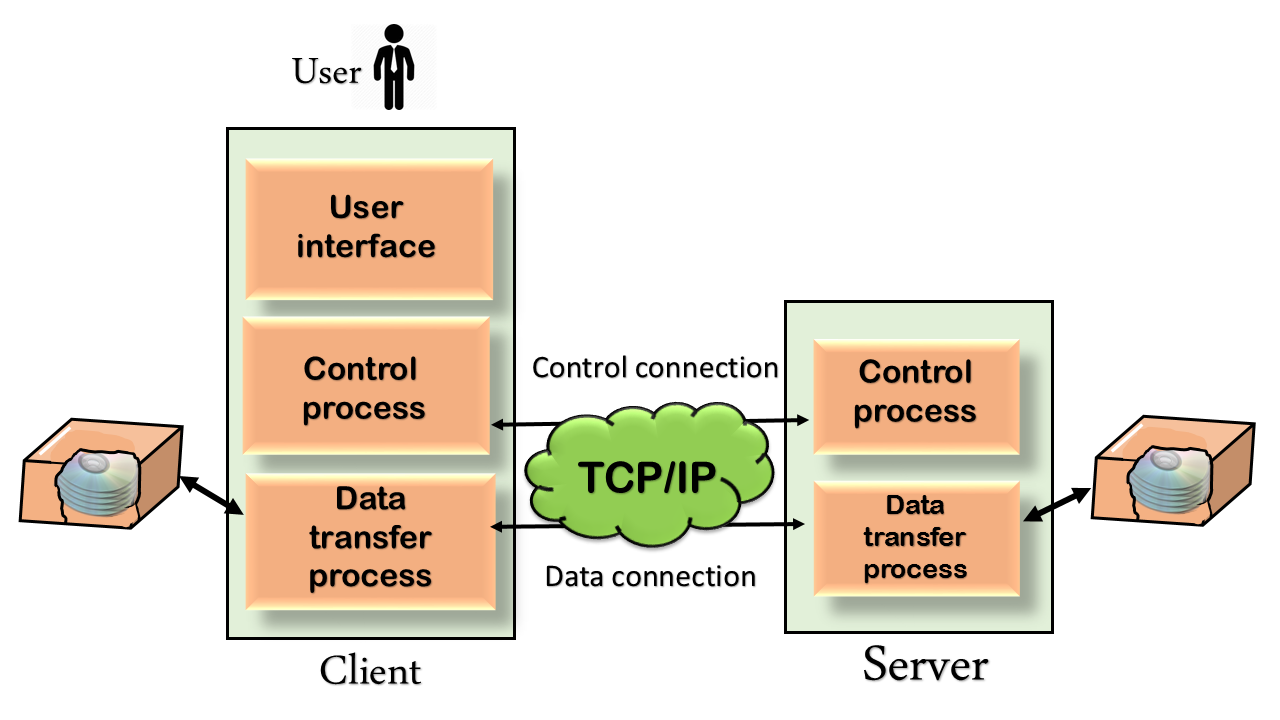
Although transferring files from one system to another is very simple and straightforward, but sometimes it can cause problems. For example, two systems may have different file conventions. Two systems may have different ways to represent text and data. Two systems may have different directory structures. FTP protocol overcomes these problems by establishing two connections between hosts. One connection is used for data transfer, and another connection is used for the control connection.

Mechanism of FTP

Computer Network FTP
The above figure shows the basic model of the FTP. The FTP client has three components: the user interface, control process, and data transfer process. The server has two components: the server control process and the server data transfer process.
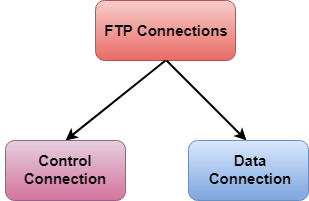
There are two types of connections in FTP:
Computer Network FTP
  • Control Connection: The control connection uses very simple rules for communication. Through control connection, we can transfer a line of command or line of response at a time. The control connection is made between the control processes. The control connection remains connected during the entire interactive FTP session.
  • Data Connection: The Data Connection uses very complex rules as data types may vary. The data connection is made between data transfer processes. The data connection opens when a command comes for transferring the files and closes when the file is transferred.

FTP Clients

  • FTP client is a program that implements a file transfer protocol which allows you to transfer files between two hosts on the internet.
  • It allows a user to connect to a remote host and upload or download the files.
  • It has a set of commands that we can use to connect to a host, transfer the files between you and your host and close the connection.
  • The FTP program is also available as a built-in component in a Web browser. This GUI based FTP client makes the file transfer very easy and also does not require to remember the FTP commands.

Advantages of FTP:

  • Speed: One of the biggest advantages of FTP is speed. The FTP is one of the fastest way to transfer the files from one computer to another computer.
  • Efficient: It is more efficient as we do not need to complete all the operations to get the entire file.
  • Security: To access the FTP server, we need to login with the username and password. Therefore, we can say that FTP is more secure.
  • Back & forth movement: FTP allows us to transfer the files back and forth. Suppose you are a manager of the company, you send some information to all the employees, and they all send information back on the same server.

Disadvantages of FTP:

  • The standard requirement of the industry is that all the FTP transmissions should be encrypted. However, not all the FTP providers are equal and not all the providers offer encryption. So, we will have to look out for the FTP providers that provides encryption.
  • FTP serves two operations, i.e., to send and receive large files on a network. However, the size limit of the file is 2GB that can be sent. It also doesn't allow you to run simultaneous transfers to multiple receivers.
  • Passwords and file contents are sent in clear text that allows unwanted eavesdropping. So, it is quite possible that attackers can carry out the brute force attack by trying to guess the FTP password.
  • It is not compatible with every system.


Reference:


SMTP


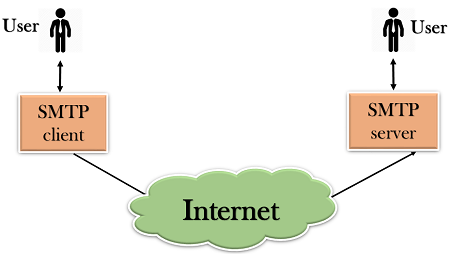
  • SMTP stands for Simple Mail Transfer Protocol.
  • SMTP is a set of communication guidelines that allow software to transmit an electronic mail over the internet is called Simple Mail Transfer Protocol.
  • It is a program used for sending messages to other computer users based on e-mail addresses.
  • It provides a mail exchange between users on the same or different computers, and it also supports:
    • It can send a single message to one or more recipients.
    • Sending message can include text, voice, video or graphics.
    • It can also send the messages on networks outside the internet.
  • The main purpose of SMTP is used to set up communication rules between servers. The servers have a way of identifying themselves and announcing what kind of communication they are trying to perform. They also have a way of handling the errors such as incorrect email address. For example, if the recipient address is wrong, then receiving server reply with an error message of some kind.

Components of SMTP

Computer Network SMTP
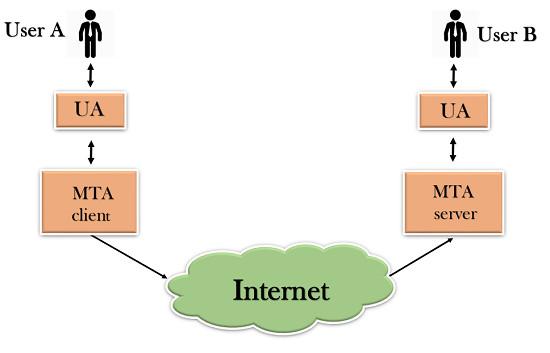
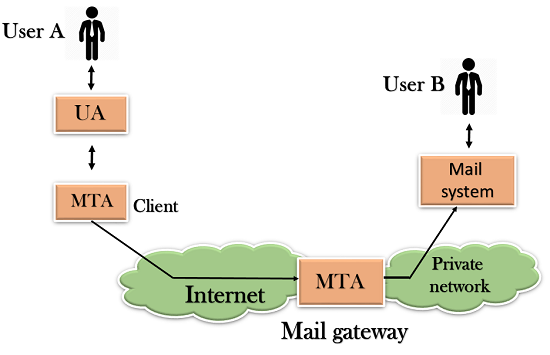
  • First, we will break the SMTP client and SMTP server into two components such as user agent (UA) and mail transfer agent (MTA). The user agent (UA) prepares the message, creates the envelope and then puts the message in the envelope. The mail transfer agent (MTA) transfers this mail across the internet.
Computer Network SMTP
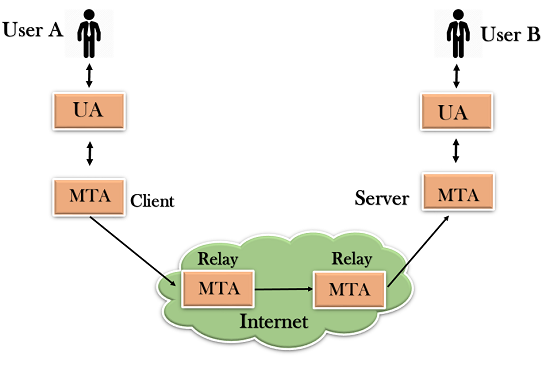
  • SMTP allows a more complex system by adding a relaying system. Instead of just having one MTA at sending side and one at receiving side, more MTAs can be added, acting either as a client or server to relay the email.
Computer Network SMTP
  • The relaying system without TCP/IP protocol can also be used to send the emails to users, and this is achieved by the use of the mail gateway. The mail gateway is a relay MTA that can be used to receive an email.
Computer Network SMTP

Working of SMTP

  1. Composition of Mail: A user sends an e-mail by composing an electronic mail message using a Mail User Agent (MUA). Mail User Agent is a program which is used to send and receive mail. The message contains two parts: body and header. The body is the main part of the message while the header includes information such as the sender and recipient address. The header also includes descriptive information such as the subject of the message. In this case, the message body is like a letter and header is like an envelope that contains the recipient's address.
  2. Submission of Mail: After composing an email, the mail client then submits the completed e-mail to the SMTP server by using SMTP on TCP port 25.
  3. Delivery of Mail: E-mail addresses contain two parts: username of the recipient and domain name. For example, vivek@gmail.com, where "vivek" is the username of the recipient and "gmail.com" is the domain name.
    If the domain name of the recipient's email address is different from the sender's domain name, then MSA will send the mail to the Mail Transfer Agent (MTA). To relay the email, the MTA will find the target domain. It checks the MX record from Domain Name System to obtain the target domain. The MX record contains the domain name and IP address of the recipient's domain. Once the record is located, MTA connects to the exchange server to relay the message.
  4. Receipt and Processing of Mail: Once the incoming message is received, the exchange server delivers it to the incoming server (Mail Delivery Agent) which stores the e-mail where it waits for the user to retrieve it.
  5. Access and Retrieval of Mail: The stored email in MDA can be retrieved by using MUA (Mail User Agent). MUA can be accessed by using login and password.

OR

he SMTP model is of two type :
  1. End-to- end method
  2. Store-and- forward method
The end to end model is used to communicate between different organizations whereas the store and forward method are used within an organization. A SMTP client who wants to send the mail will contact the destination’s host SMTP directly in order to send the mail to the destination. The SMTP server will keep the mail to itself until it is successfully copied to the receiver’s SMTP.
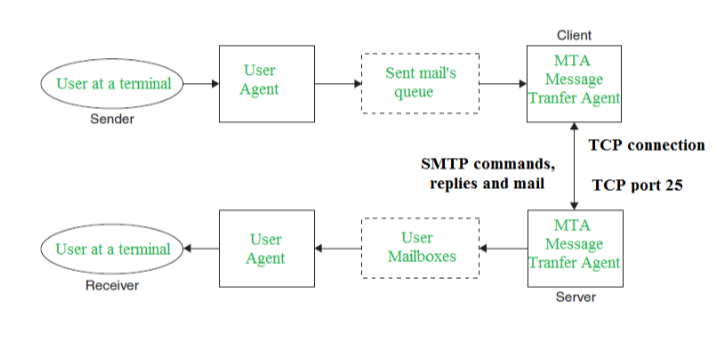
The client SMTP is the one which initiates the session let us call it as the client- SMTP and the server SMTP is the one which responds to the session request and let us call it as receiver-SMTP. The client- SMTP will start the session and the receiver-SMTP will respond to the request.

Model of SMTP system
In the SMTP model user deals with the user agent (UA) for example Microsoft Outlook, Netscape, Mozilla, etc. In order to exchange the mail using TCP, MTA is used. The users sending the mail do not have to deal with the MTA it is the responsibility of the system admin to set up the local MTA. The MTA maintains a small queue of mails so that it can schedule repeat delivery of mail in case the receiver is not available. The MTA delivers the mail to the mailboxes and the information can later be downloaded by the user agents.
SMTP_1
Both the SMTP-client and MSTP-server should have 2 components:
  1. User agent (UA)
  2. Local MTA
Communication between sender and the receiver :
The senders, user agent prepare the message and send it to the MTA. The MTA functioning is to transfer the mail across the network to the receivers MTA. To send mail, a system must have the client MTA, and to receive mail, a system must have a server MTA.

SENDING EMAIL:
Mail is sent by a series of request and response messages between the client and a server. The message which is sent across consists of a header and the body. A null line is used to terminate the mail header. Everything which is after the null line is considered as the body of the message which is a sequence of ASCII characters. The message body contains the actual information read by the receipt.
RECEIVING EMAIL:
The user agent at the server side checks the mailboxes at a particular time of intervals. If any information is received it informs the user about the mail. When the user tries to read the mail it displays a list of mails with a short description of each mail in the mailbox. By selecting any of the mail user can view its contents on the terminal.

Reference:

Telnet


  • The main task of the internet is to provide services to users. For example, users want to run different application programs at the remote site and transfers a result to the local site. This requires a client-server program such as FTP, SMTP. But this would not allow us to create a specific program for each demand.
  • The better solution is to provide a general client-server program that lets the user access any application program on a remote computer. Therefore, a program that allows a user to log on to a remote computer. A popular client-server program Telnet is used to meet such demands. Telnet is an abbreviation for Terminal Network.
  • Telnet provides a connection to the remote computer in such a way that a local terminal appears to be at the remote side.

There are two types of login:

    Local Login

    Computer Network Telnet
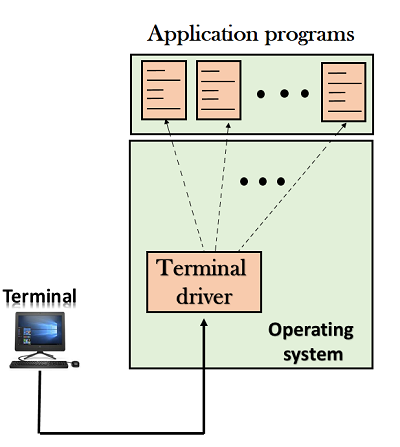
    • When a user logs into a local computer, then it is known as local login.
    • When the workstation running terminal emulator, the keystrokes entered by the user are accepted by the terminal driver. The terminal driver then passes these characters to the operating system which in turn, invokes the desired application program.
    • However, the operating system has special meaning to special characters. For example, in UNIX some combination of characters have special meanings such as control character with "z" means suspend. Such situations do not create any problem as the terminal driver knows the meaning of such characters. But, it can cause the problems in remote login.

    Remote login

    Computer Network Telnet
    • When the user wants to access an application program on a remote computer, then the user must perform remote login.

    How remote login occurs

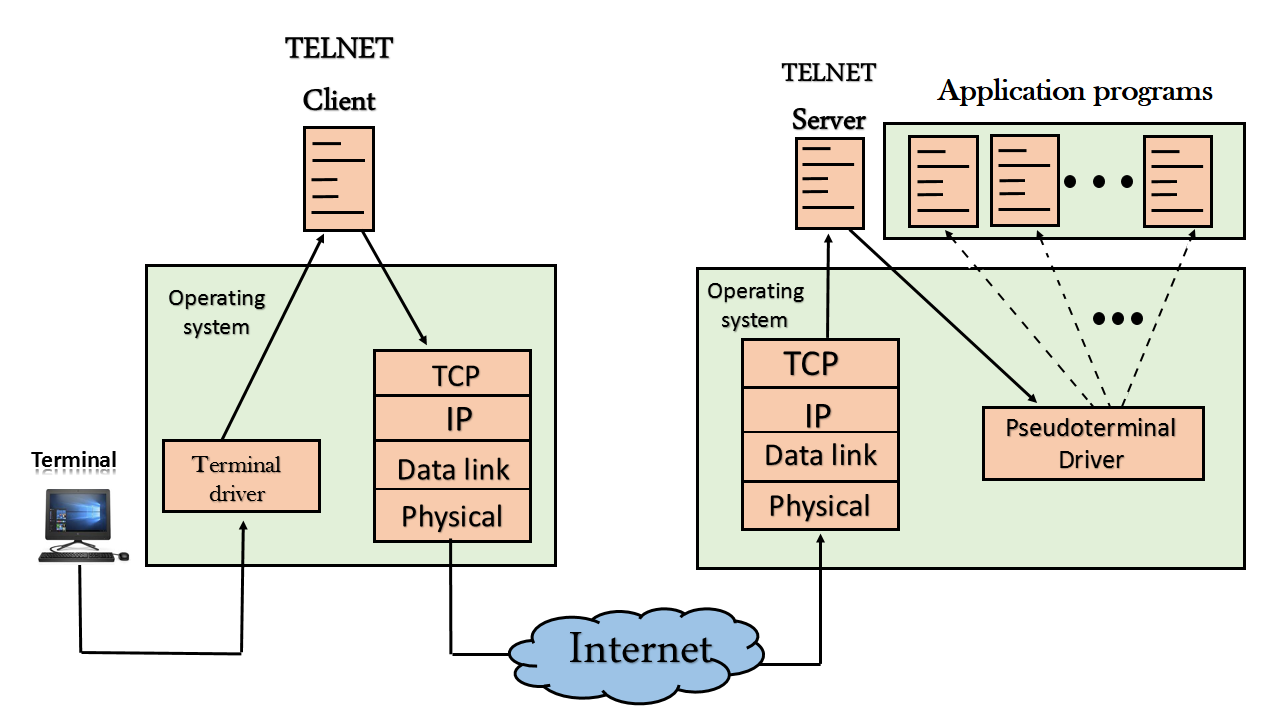
    At the local site

    The user sends the keystrokes to the terminal driver, the characters are then sent to the TELNET client. The TELNET client which in turn, transforms the characters to a universal character set known as network virtual terminal characters and delivers them to the local TCP/IP stack

    At the remote site

    The commands in NVT forms are transmitted to the TCP/IP at the remote machine. Here, the characters are delivered to the operating system and then pass to the TELNET server. The TELNET server transforms the characters which can be understandable by a remote computer. However, the characters cannot be directly passed to the operating system as a remote operating system does not receive the characters from the TELNET server. Therefore it requires some piece of software that can accept the characters from the TELNET server. The operating system then passes these characters to the appropriate application program.

    Network Virtual Terminal (NVT)

    Computer Network Telnet
    • The network virtual terminal is an interface that defines how data and commands are sent across the network.
    • In today's world, systems are heterogeneous. For example, the operating system accepts a special combination of characters such as end-of-file token running a DOS operating system ctrl+z while the token running a UNIX operating system is ctrl+d.
    • TELNET solves this issue by defining a universal interface known as network virtual interface.
    • The TELNET client translates the characters that come from the local terminal into NVT form and then delivers them to the network. The Telnet server then translates the data from NVT form into a form which can be understandable by a remote computer.

Features –

  1. t doesn’t support authentication.
  2. Data is sent in clear text therefore less secure.
  3. No encryption mechanism is used.
  4. Designed to work in local networks only.
Troubleshooting –
While using telnet or ssh, keep these things in mind:
2. Secure Shell (SSH):
SSH is also an application client-server protocol used to take remote access of a device. It uses TCP port number 23.
Features –
  1. Unlike telnet, it provides authentication methods.
  2. The data sent is in encrypted form.
  3. It is designed to work in public network.
  4. It uses public key for encryption mechanism.
In short, SSH is more secure than telnet and has almost replaced telnet.

Reference:


javatpoint.com/computer-network-telnet